Common Queries
Average Price
Here is an example of how to find the unweighted average price in each region, using Nemosis and Pandas.
The energy prices are available in table DISPATCHPRICE.
import os

from nemosis import dynamic_data_compiler

start_time = "2025/07/01 00:05:00"
end_time = "2025/08/01 00:00:00"
table = "DISPATCHPRICE"

# I re-use this folder across all projects, to avoid re-downloading
data_directory = "/home/matthew/Data/nemosis/"

# nemosis will not create the directory for us
if not os.path.exists(data_directory):
    os.makedirs(data_directory)

# download and preprocess the data with nemosis
# returning a Pandas dataframe
df = dynamic_data_compiler(start_time, end_time, table, data_directory)

# drop INTERVENTION==1
df = df.loc[df["INTERVENTION"] == 0]

# aggregate with mean by region
# RRP is price column
result = df.groupby("REGIONID")["RRP"].mean()
print(result)
This yields:
INFO: Compiling data for table DISPATCHPRICE
INFO: Returning DISPATCHPRICE.
REGIONID
NSW1     96.937920
QLD1     82.126428
SA1     164.951991
TAS1    117.847834
VIC1     82.122759
Name: RRP, dtype: float64
I recommend explicitly checking that the dataframe starts and ends when you expect. It is easy to get an off-by-one error.
Revenue Skewness
Here is an example of how outliers drive generator revenue. The objective of this query is to find the numbers for the following claim: "Half of all generators' energy revenue each year comes from only x% of trading intervals." (Here I am excluding FCAS revenue.)
We can get energy prices from DISPATCHPRICE, and energy per generator per interval from DISPATCH_UNIT_SCADA.
(DISPATCHLOAD also contains energy measurements per generator per interval. However it contains a lot more data too, so the files are far bigger.)
The docs for DISPATCH_UNIT_SCADA say SCADAVALUE is the "Instantaneous MW reading from SCADA at the start of the Dispatch interval".
I will use linear interpolation to join the dots.
For most cases this is good enough.
In practice the power level of generators does meander from this diagonal line.
(e.g. data lags mean that generators may have a constant output for the first 30 seconds or so, then ramp to their next level.)
If you want more exact data, you can use the 4 Second SCADA data. That is very large though.
For this example I will download the data with Nemosis, and then query it with Polars.
I sink the result to a Parquet file, then read them back. This may seem unnecessary, but this is a trick to reduce memory consumption. (This query uses a lot of memory for a normal sized laptop.) Similarly, I did not really have to parse the timestamps. Doing so reduces the memory footprint of the join.
from nemosis import cache_compiler
import polars as pl
import os

start_time = "2024/01/01 00:00:00"
end_time = "2024/12/31 23:55:00"
data_directory = "/home/matthew/Data/nemosis/"
# data_directory = '/media/matthew/nemweb/nemosis'
results_directory = os.path.join(os.path.dirname(data_directory), "results")
result_path = os.path.join(results_directory, "results.parquet")

for d in [data_directory, results_directory]:
    os.makedirs(d, exist_ok=True)

hrs_per_interval = 5 / 60  # 5 minute intervals
frac_threshold = 0.5

dt_fmt = "%Y/%m/%d %H:%M:%S"

# reduce memory usage
os.environ["POLARS_MAX_THREADS"] = str(max(1, os.cpu_count() // 2))

for table in ["DISPATCHPRICE", "DISPATCH_UNIT_SCADA", "DUDETAILSUMMARY"]:
    cache_compiler(start_time, end_time, table, data_directory, fformat="parquet")

# query the data with Polars
prices = (
    pl.scan_parquet(os.path.join(data_directory, "*DISPATCHPRICE*.parquet"))
    .filter(pl.col("INTERVENTION") == 0)
    .rename({"RRP": "PRICE"})
    .with_columns(
        pl.col("SETTLEMENTDATE").str.strptime(
            pl.Datetime(time_unit="ms"), format=dt_fmt
        )
    )
)

# calculate average energy per generator from instantaneous power
energy = (
    pl.scan_parquet(os.path.join(data_directory, "*DISPATCH_UNIT_SCADA*.parquet"))
    .rename({"SCADAVALUE": "POWER_START"})
    # Find the next POWER_START per DUID, and call that POWER_END
    .sort("DUID", "SETTLEMENTDATE")
    .with_columns(pl.col("POWER_START").shift(-1).over("DUID").alias("POWER_END"))
    .with_columns(
        ((pl.col("POWER_START") + pl.col("POWER_END")) / 2).alias("POWER_AVG")
    )
    .with_columns((pl.col("POWER_AVG") * hrs_per_interval).alias("ENERGY_MWH"))
    .with_columns(
        pl.col("SETTLEMENTDATE").str.strptime(
            pl.Datetime(time_unit="ms"), format=dt_fmt
        )
    )
)


generator_static = (
    pl.scan_parquet(os.path.join(data_directory, "*DUDETAILSUMMARY*.parquet"))
    # filter out LOAD and BIDIRECTIONAL
    # this might include some batteries and pumped hydro actually
    .filter(pl.col("DISPATCHTYPE") == "GENERATOR")
    # deduplicate (this is standing data which may be repeated each month,
    # and other columns change over time anyway)
    .sort("START_DATE", "LASTCHANGED")
    .select("DUID", "REGIONID")
)

# join energy with generator data to get region
# then join with prices

(
    energy.join(generator_static, how="left", on="DUID")
    .join(prices, how="left", on=["REGIONID", "SETTLEMENTDATE"])
    .with_columns((pl.col("PRICE") * pl.col("ENERGY_MWH")).alias("REVENUE"))
    # aggregate to all generators within a region
    .group_by("REGIONID", "SETTLEMENTDATE")
    .agg(pl.col("REVENUE").sum())
    # find the most profitable intervals
    .sort("REGIONID", "REVENUE", descending=True)
    # find the cumulative fraction of revenue over the time period
    .with_columns(
        (
            pl.col("REVENUE").cum_sum().over("REGIONID")
            / pl.col("REVENUE").sum().over("REGIONID")
        ).alias("FRAC_REVENUE"),
        (
            pl.int_range(1, pl.len() + 1).over("REGIONID") / pl.len().over("REGIONID")
        ).alias("FRAC_TIME"),
    )
    # find the last row just before 50%
    .filter(pl.col("FRAC_REVENUE") <= frac_threshold)
    .group_by("REGIONID")
    .last()
    .select("REGIONID", "FRAC_TIME")
    .sort("FRAC_TIME")
    # stream to parquet and then read back
    # because just calling .collect() uses lots of memory (Polars issue)
    .sink_parquet(result_path)
)

print(pl.read_parquet(result_path))
This yields:
REGIONID |
FRAC_TIME |
|---|---|
SA1 |
0.05997 |
NSW1 |
0.085669 |
QLD1 |
0.108968 |
VIC1 |
0.113849 |
TAS1 |
0.131157 |
i.e. In 2024, generators in South Australia earned half of their revenue during the best 6% of the time.
Rooftop Solar
Unlike most generation, rooftop solar is not directly measured. (This is true even in Victoria, where smart meters are mandatory.) Instead AEMO estimates how much power is, was or will be generated by rooftop solar. Typically AEMO (and most other grid operators too) treat solar power as negative consumption, due to the unique data provenance. This leads to funny things like "negative" demand.
Tip
For most analysis, I recommend doing the work to get rooftop solar data, and adding it to large-scale generation.
Suppose you want to analyse some data from Australia's national electricity market, to see our current fuel mix. To figure out the fuel mix, you take the per-generator power DISPATCH_UNIT_SCADA (or DISPATCHLOAD), and join that to a list of generators with fuel type and region (e.g. the participant registration list). Then you can do a simple group by and sum up the energy. You will find that 8.4% of South Australia's generation in 2024 was from solar.
However this is actually not correct.
Once you add rooftop solar, you see that actually 28.4% of South Australia's generation in 2024 was from solar.
Without including rooftop solar, you would be wrong by a factor of 3.
For more information, see my post on LinkedIn.
Warning
Shortly after I wrote this, AEMO introduced several new tables for rooftop solar estimates, and they plan to deprecate the ROOFTOP_PV_ACTUAL table I used here. I have not yet had a chance to look in details. The details of the interpolation and deduplication have probably changed.
Rooftop solar data takes a bit of work to get. It is 30 minute granularity, so do not forget to upsample it. If you append it to large-scale generation data without upsampling, you will have 0 for 5 out of every 6 intervals.
You should filter out REGIONIDs which do not end in 1, as described earlier.
There are also overlapping rows because data comes from several different estimation methods. In the TYPE column the possible values are DAILY, MEASUREMENT, SATELLITE. SATELLITE is the most accurate, so take that if it is available. MEASUREMENT is the next most accurate. Luckily this is reverse alphabetical order.
QI is a quality indicator.
I am unsure, but I think you should take the best TYPE, and then break ties by taking the highest QI.
As an example, here is how to get deduplicated 5-minute rooftop solar data with Polars:
import datetime as dt


# requires collecting
def upsample(lf, time_col, group_col="REGIONID") -> pl.DataFrame:
    return (
        lf.sort(time_col, group_col)
        .collect()
        .upsample(
            time_column=time_col,
            every=dt.timedelta(minutes=5),
            group_by=group_col,
            maintain_order=True,
        )
        .fill_null(strategy="backward", limit=5)
    )


lf = (
    pl.scan_parquet(os.path.join(data_cache_dir, "*ROOFTOP_PV_ACTUAL*.parquet"))
    .pipe(
        lambda lf: parse_datetimes(lf, cols=["INTERVAL_END"])
    )  # parse_datetimes defined earlier
    .filter(pl.col("REGIONID").str.ends_with("1"))
    # deduplicate
    .sort(by=["TYPE", "QI", "LASTCHANGED"], descending=[False, True, True])
    .group_by(["REGIONID", "INTERVAL_DATETIME"])
    .first()
    .select(["REGIONID", "INTERVAL_DATETIME", "POWER"])
    .rename({"INTERVAL_DATETIME": "INTERVAL_END"})
    # interpolate rooftop solar from 30 minutes to 5
    .pipe(lambda lf: upsample(lf, time_col="INTERVAL_END"))
    .lazy()
)
Unfortunately upsampling from 30 minutes to 5 minutes generally requires that you have all the data in memory.
For Polars this means you cannot stream, so I call .collect() first. This particular table is small enough that this is generally not a problem.
If it is a problem, or just too fiddly, a workaround is to duplicate the data 6 times, adding 5 × N minutes to each timestamp, then concatenating them vertically. (Making sure that you duplicate power, not energy.)
Price Predictions
We can obtain AEMO's price predictions (including the history of predictions made at various times for a given period) from "predispatch" data. The predispatch process was explained earlier.
There are 3 relevant tables.
Of these 3, P5MIN_REGIONSOLUTION and PREDISPATCHPRICE both contain a history of price predictions.
This can be tricky to get your head around at first.
Read the section earlier about two-dimensional time.
DISPATCHPRICEcontains the actual, final price. (Do not forget to filter to include onlyINTERVENTION==0)P5MIN_REGIONSOLUTIONcontains predictions for the next hour or so, at 5 minute granularity. There are three datetime columns.INTERVAL_DATETIMEis the end of the 5-minute period which the prediction was made for.RUN_DATETIMEis the end of the 5-minute period when the prediction was published.LASTCHANGEDis the exact time when the prediction was made. (RUN_DATETIMEis justLASTCHANGEDrounded up to the next 5 minute mark.)PREDISPATCHPRICEcontainsDATETIME(the end of the 5-minute period which the prediction applies to) andLASTCHANGED(when the prediction was generated). There is noRUN_DATETIMEcolumn.PREDISPATCHSEQNOis related toLASTCHANGEDrounded up to the next 5 minutes, but in a format which is a bit awkward to use. So just round upLASTCHANGEDinstead. Do not forget to filter to include onlyINTERVENTION==0.RRPis the price column. The precise meaning of the price and other forecast values in this table is a bit nuanced. See this article and this article. It is really every 6th 5-minute price. So my view is that you should linearly interpolate between these (based on interval end) to get the full 5 minute predictions. These predictions are only revised every half hour.
You can read more about how far the data extends and the different granularities in Watt Clarity.
These tables overlap.
The P5MIN_REGIONSOLUTION contains 'predictions' made in the same interval they apply to.
This is what DISPATCHPRICE does (which are definite, final prices, not predictions).
Given the timestamps, you would expect that P5MIN_REGIONSOLUTION is exactly the same as DISPATCHPRICE for rows where INTERVAL_DATETIME == RUN_DATETIME. However there are some slight approximations made in predispatch calculations, to speed the computation up. So predispatch is not exactly the same algorithm as dispatch. Thus P5MIN_REGIONSOLUTION may be wrong for INTERVAL_DATETIME == RUN_DATETIME.
So choose DISPATCHPRICE for those rows.
There is also an overlap between P5MIN_REGIONSOLUTION and PREDISPATCHPRICE (even before interpolating). When this happens, use P5MIN_REGIONSOLUTION.
So for each interval the prediction was made for, for each interval the prediction was made in, if there are multiple rows, choose DISPATCHPRICE, then P5MIN_REGIONSOLUTION, then PREDISPATCHPRICE.
This is a good approach for operational queries, where you just filter for predictions for the next interval.
For analytic queries, this data is large. In that case, doing a join and deduplication (e.g. vertical concatenation, then group by the two timestamp columns, sort by which table it came from etc) is very expensive (i.e. your laptop will run out of memory). So you can filter each table instead with conditions about the distance between the two time columns.
DISPATCHPRICEfor the actual priceP5MIN_REGIONSOLUTION: filter toRUN_DATETIME<INTERVAL_DATETIME, to get medium-term, 5-minute granularity forecasts, up to 2 hours in advance. e.g. the earliest prediction for the 01:00-01:05 interval (INTERVAL_DATETIME01:05) is published in the 00:00-00:05 interval (e.g.LASTCHANGED00:00:30)PREDISPATCHPRICE: filter toLASTCHANGED < DATETIME - 1 hour. i.e. predictions made more than 1 hour in advance.
If these last few paragraphs were unclear, just read the code in example below.
Most PREDISPATCH* tables are very large.
So there is a subset of each PREDISPATCH* table in the normal DATA folder on Nemweb. The full dataset is in ../PREDISPATCH_ALL_DATA (as mentioned earlier):
e.g.
This is true even for PREDISPATCHPRICE, even though it is a moderate size.
See the example code:
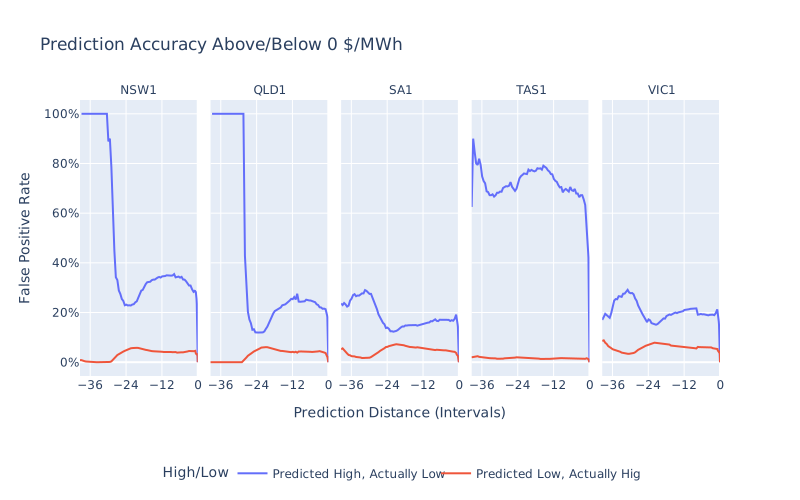
In this example I try to analyse how AEMO's price predictions get more/less accurate depending on how far in advance they are made. Specifically I compare whether the predictions are on the correct side of 0 $/MWh. I expected them to get monotonically better (i.e. downward sloping graph), but that is not the case. The rise around 24 hours shows that sometimes the closer we get to the time period AEMO is predicting, the worse the predictions get (for some regions, for some hours out, for this particular definition of "worse").
Grouping By Fuel Type
The fuel type (e.g. coal vs solar) of each generator can be found in the list of registered participants (file "NEM Registration and Exemption List", sheet "PU and Scheduled Loads"). Nemosis gives us an easy way to download this with the "Generators and Scheduled Loads" table. Although at the time of writing, AEMO has recently changed their firewall rules in a way which breaks Nemosis. The example below shows how to use Nemosis, and how to use a workaround.
There are multiple columns relating to fuel type, with quite varied, detailed, inconsistent and even misspelled values. You will probably need to hard code some if statements to classify these into something simpler.
Warning
Watch out: If a generator's fuel type includes the substring "gas", it might be "biogas" or "landfill gas", which is biofuel not natural gas. If a generator's fuel type includes the word "coal", it might be "coal seam gas", which is gas not coal.
This example uses Polars.
import os

from nemosis import static_table
import polars as pl
import requests

# Point to a folder on your machine
nemosis_data_cache = "/home/matthew/Data/nemosis/"

# Download The Data


# This normally works
# But AEMO's recent firewall change broke it
# https://github.com/UNSW-CEEM/NEMOSIS/issues/60
def get_with_nemosis():
    os.makedirs(nemosis_data_cache, exist_ok=True)
    df_pd = static_table("Generators and Scheduled Loads", nemosis_data_cache)
    # from Pandas to Polars
    df_pl = pl.from_pandas(df_pd)
    return df_pl


# A fallback, which is a bit more fiddly
def get_manually():
    url = "https://www.aemo.com.au/-/media/files/electricity/nem/participant_information/nem-registration-and-exemption-list.xlsx"

    # AEMO recently started discriminating based on User-Agent, blocking us
    # AEMO, if you are reading this and do not like it, then please
    # just serve this file through your existing channels for automated downloads.
    # i.e. the MMS Participant Data Replicator channels (nemweb and FTP)
    headers = {
        "Referer": "https://www.aemo.com.au/energy-systems/electricity/national-electricity-market-nem/participate-in-the-market/registration",
        "User-Agent": "Mozilla/5.0 (X11; Linux x86_64) AppleWebKit/537.36",
    }

    response = requests.get(url, headers=headers)
    response.raise_for_status()

    return pl.read_excel(response.content, sheet_name="PU and Scheduled Loads")


try:
    df = get_with_nemosis()
except ValueError as e:
    if (
        str(e)
        == "Excel file format cannot be determined, you must specify an engine manually."
    ):
        print(f"Nemosis failed, switching to fallback method")
        df = get_manually()
    else:
        raise

df.head()

# Simplify Fuel Categories

static: pl.LazyFrame = (
    df
    # simplify fuel categories
    .with_columns(
        pl.concat_str(
            [
                "Fuel Source - Primary",
                "Technology Type - Descriptor",
                "Fuel Source - Descriptor",
            ],
            separator=" - ",
        )
        .str.to_lowercase()
        .alias("Fuel Detail"),
    )
    .filter(~pl.col("Participant").str.contains("Basslink"))
    .with_columns(
        pl.when(
            (pl.col("DUID") == "-")
            & (pl.col("Station Name").str.contains("Jindabyne Pump At Guthega"))
        )
        .then(pl.lit("hydro"))  # exception for this one
        .when(pl.col("Fuel Detail").str.contains("battery"))
        .then(pl.lit("battery"))
        .when(
            pl.col("Fuel Detail").str.contains("hydro")
            & (pl.col("Dispatch Type") == "Load")
        )
        .then(pl.lit("pumps"))
        .when(pl.col("Fuel Detail").str.contains("hydro"))
        .then(pl.lit("hydro"))
        .when(pl.col("Fuel Detail").str.contains("solar"))
        .then(pl.lit("solar_gridscale"))
        .when(pl.col("Fuel Detail").str.contains("wind"))
        .then(pl.lit("wind"))
        .when(pl.col("Fuel Detail").str.contains("waste coal mine gas"))
        .then(pl.lit("coal"))
        .when(
            pl.any_horizontal(
                (
                    pl.col("Fuel Detail").str.contains(s)
                    for s in [
                        "natural gas",
                        "ocgt",
                        "coal seam gas",
                        "coal seam methane",
                    ]
                )
            )
        )
        .then(pl.lit("gas"))
        .when(
            pl.any_horizontal(
                (pl.col("Fuel Detail").str.contains(c))
                # don't blindly search for the word "coal"
                # because coal seam gas should count as gas not coal
                for c in ["black coal", "brown coal"]
            )
        )
        .then(pl.lit("coal"))
        .when(pl.col("Fuel Detail").str.contains("diesel"))
        .then(pl.lit("distillate"))
        .when(pl.col("Fuel Detail").str.contains("biomass"))
        .then(pl.lit("biomass"))
        .when(pl.col("DUID").str.contains("PUMP") & (pl.col("Dispatch Type") == "Load"))
        .then(pl.lit("pumps"))
        .alias("FUEL_TYPE")
    )
    .select("DUID", pl.col("Region").alias("REGIONID"), "FUEL_TYPE")
)

# check we've categorised everything
uncategorised = static.filter(pl.col("FUEL_TYPE").is_null())
if not uncategorised.is_empty():
    display(uncategorised)

assert uncategorised.height == 0, "Some generators were not categorised"
Now we have a dataframe (static) which has columns:
DUID: generator identifierREGIONID: where is itFUEL_TYPE: wind, battery, distillate, hydro, biomass, pumps, coal, solar_gridscale, gas
Note that rooftop solar is not included here because it does not have a DUID. Some generators appear here, but not elsewhere, because they are non-scheduled. Some generators appear elsewhere but not here because they have been decommissioned.
Emissions Data (CO2)
The emissions intensity of generators (a static value representing the average emissions in tonnes of CO2e per MWh) is published in the GENUNITS table in the usual MMSDM location. This also contains columns about the provenance of this emissions intensity data.
This is per-genset (GENSETID), which means there may be more than one value per DUID. (See the hierarchy earlier.)
Most power data is DUID level, so we need to aggregate somehow. This example shows one way to do that.
import datetime as dt
from zipfile import ZipFile
from io import BytesIO

import requests
import polars as pl
import polars.selectors as cs

# Static Data
#
# First we get the emissions intensity data, `GENSETID` and `DUID` from the `GENUNITS` table.
#
# Note that this is one row per `GENSETID`, not one row per `DUID`.
# Most power/energy data (e.g. `DISPATCHUNITSCADA`, `P5UNITSOLUTION`) is at the `DUID` level.
# So if we want to multiply emissions per unit of energy by energy, we need to somehow aggregate emissions intensity to the `DUID` level. (I am not aware of `GENSETID` level power measurements in the public data.)


def read_csv_from_url(url) -> pl.DataFrame:
    # Since these files are small, I am just downloading from nemweb each time,
    # instead of caching files locally.
    # Once you start downloading bigger data (e.g. power data),
    # you should download the files first (if not already downloaded from the last run),
    # and then read from disk.
    # The purpose of this example is to show the joins later on.
    # This part is not the focus.

    r = requests.get(url)
    r.raise_for_status()

    assert url.upper().endswith(".ZIP"), "Expected URL to zip"
    with ZipFile(BytesIO(r.content)) as zf:
        assert len(zf.namelist()) == 1, (
            f"Expected 1 file inside the zip, got {len(zf.namelist())}"
        )
        csv_name = zf.namelist()[0]
        assert csv_name.upper().endswith(".CSV"), f"File inside zip is not a CSV"
        with zf.open(csv_name) as csv_f:
            df = (
                pl.read_csv(
                    csv_f,
                    skip_rows=1,  # skip the header
                    comment_prefix='C,"END OF REPORT",',  # skip the footer
                ).select(~cs.by_index(range(4)))  # drop metadata columns
            )

    return df


def read_table(table):
    # Quick approach to find the latest or second-latest data:
    # take current date, minus 2 months. That should contain what we need.
    today = dt.date.today()
    ago = today - dt.timedelta(days=30 + 31)
    url = (
        f"https://www.nemweb.com.au/Data_Archive/Wholesale_Electricity/"
        f"MMSDM/2025/MMSDM_{ago.year}_{ago.month:02d}/MMSDM_Historical_Data_SQLLoader/DATA/"
        f"PUBLIC_ARCHIVE%23{table}%23FILE01%23{ago.year}{ago.month:02d}010000.zip"
    )
    return read_csv_from_url(url)


emissions_per_genset = read_table("GENUNITS")

genset_to_duid = (
    read_table("DUALLOC")
    # deduplicate to get the latest record per GENSETID
    .sort("EFFECTIVEDATE", "LASTCHANGED", descending=True)
    .select("DUID", "GENSETID")
    .unique(["DUID", "GENSETID"])
)

# We could blindly take the mean across all `GENSETID`s for each `DUID`.
# Let's try to do one step better, and take a weighted mean based on capacity.
#
# Which Capacity? "Max" or "Registered"? It is not clear.
# See https://wattclarity.com.au/articles/2022/09/analyticalchallenge-installedcapacity/
capacity_col = "REGISTEREDCAPACITY"  # or "MAXCAPACITY"

emissions_per_duid = (
    emissions_per_genset.join(genset_to_duid, how="left", on="GENSETID")
    .group_by("DUID")
    .agg(
        # weighted mean
        (
            (pl.col("CO2E_EMISSIONS_FACTOR") * pl.col(capacity_col)).sum()
            / pl.col(capacity_col).sum()
        ).alias("CO2E_EMISSIONS_FACTOR")
    )
    .sort("CO2E_EMISSIONS_FACTOR")
)
Now we have columns DUID (generator) and CO2E_EMISSIONS_FACTOR (tonnes of CO2e per MWh)
You could join this with generator-level power data to get generator-level emissions. In theory you can do this at a 5 minute granularity. However you should smooth things out to a larger timescale before interpreting, because this is average emissions intensity. e.g. coal generators emit a lot of CO2 when starting up, hours before the export the first MWh, and the efficiency depends on the power level. (More generally, you should be very wary of any causal inference at the 5 minute level. Fossil fuel generators and even wind/solar/batteries make decisions over time with dynamic constraints. Intervals are not really independent.)
There is daily region-level emissions (and per-generator emissions intensity data again) in the CDEII subdirectory of the realtime data folder.
CO2EII_AVAILABLE_GENERATORS.CSVis per-generator emissions intensity. These figures may differ slightly from those inGENUNITS.CO2EII_SUMMARY_RESULTS.CSVcontains daily emissions data per region.
Whilst most other realtime data in /CURRENT/ is harder to parse than the monthly data, thankfully this data is only one table per CSV (with a header, footer and 4 metadata columns), like the monthly data.
The monthly data does not include any tables called CDEII, but does include something with CO2E in the name (BILLING_CO2E_PUBLICATION).
This appears to be the same data as CO2EII_SUMMARY_RESULTS.CSV, but with a few extra columns (and only for one month).
I would not be surprised if the emissions numbers themselves differed slightly.
If so, my guess is that the monthly one is more accurate, because it is "billing" quality.
If you find out more, please reach out to me so I can add more detail here for others.